GPS Tracker - Live Locator
- 3.8
- Rating
- 1.00M
- Installs
- Free
- Price
 Analysis by App-foxy
GPS Tracker - Live Locator is the kind of navigation app that makes a strong first impression because its purpose is immediately clear: it helps you keep track of people you know and share a live location when that is useful. I found the idea easy to understand from the first launch, especially for everyday situations where a quick location update is more practical than a series of messages. It is free, aimed at everyone, and developed by THE DRAKEN GROUP, LLC, so the barrier to trying it is low.
What matters more than the novelty, though, is whether a location-sharing tool becomes part of a routine instead of being opened once and forgotten. My view is that this app has a genuine chance of earning that place for families, friends, and small groups with recurring coordination needs. It is less convincing for someone who only wants turn-by-turn directions or a complete travel-navigation suite. That distinction is important: this is primarily about knowing where people are and sharing your own position, not replacing every tool on your phone.
Why the first week feels useful
The first-week appeal comes from removing a small but familiar source of friction. If somebody is late, travelling to meet you, walking home, or trying to coordinate several people at once, a live locator can be more useful than asking for repeated updates. Instead of sending “Where are you now?” and waiting for a reply, you can use the shared map as the central point of reference. That makes the app feel practical almost immediately.
You May Also Like

 Blood Strike: 2.5 Anniversary
Blood Strike’s Loadouts Turn Every Drop Into a Tactical Gamble
A close look at Blood Strike’s custom loadouts: how fast access to signature weapons reshapes its battle royale rhythm, rewards preparation, and narrows the gap between fights.

 Pandora - Music & Podcasts
Pandora’s Music Is Easy to Start, but Harder to Recover
Pandora’s strength is its low-effort path from a seed to a station. Its weak spot is how much confidence it asks you to place in connection, setup, and quiet recovery.

 8 Ball Pool
 Is Built on Rivalries, Rematches, and Routine
A close look at the rivalries, rematches, shared routines, and unanswered safety questions that turn a quick pool match into a persistent mobile community.

 Samsung Music
’s Quiet Strength Is Playing What You Already Own
Its reach comes less from spectacle than from dependable access to a personal library. That simplicity is both the app’s strongest retention engine and its ceiling.

 AccuWeather: Weather Radar
AccuWeather Review: A Quick, Clear Forecast for Everyday Decisions
For everyday plans, the best forecast is the one you can understand quickly. AccuWeather makes rain timing, radar, and local conditions easy to act on, with a few trade-offs.

 Hill Climb Racing
Why Hill Climb Racing Still Turns Crashes Into One More Run
A tiny car, a bumpy hill and one more upgrade: Hill Climb Racing keeps resurfacing because its simple chaos makes every near-miss feel personal.
More From Our News Desk



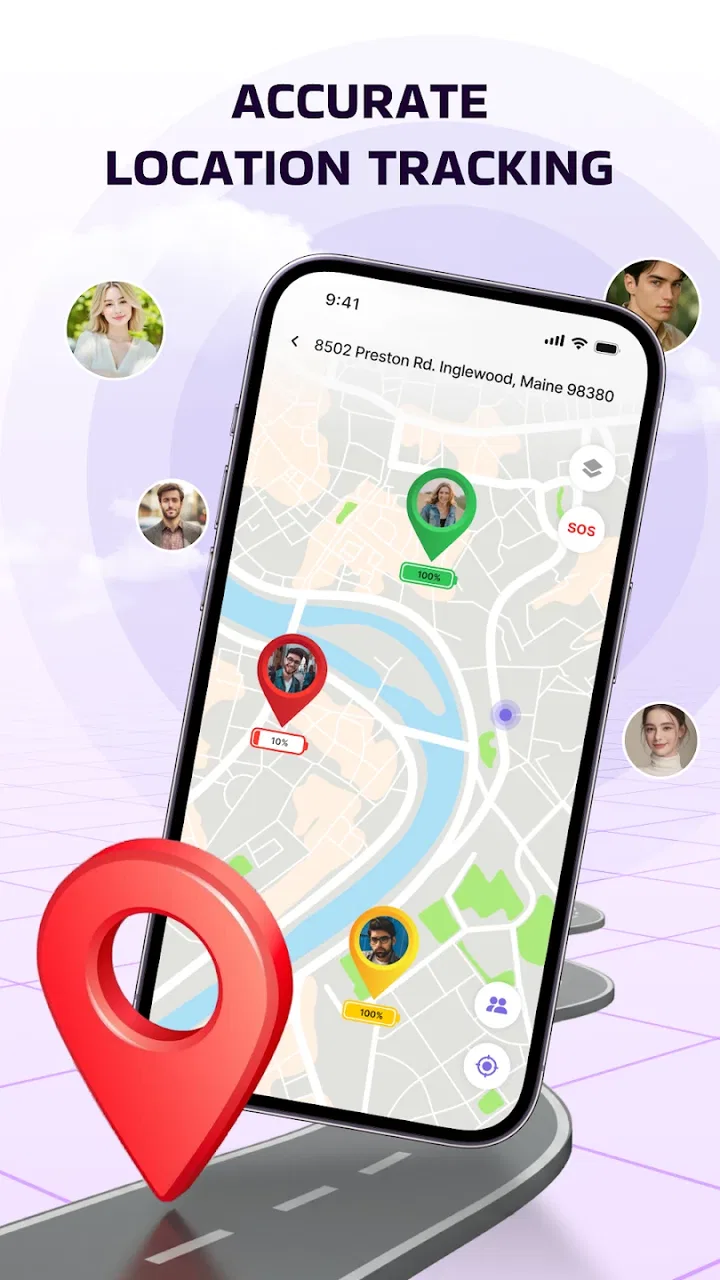
I also like the difference between a one-time location message and an ongoing live location view. A static pin can become outdated as soon as the person starts moving. A live tracker is better suited to situations where timing matters, such as meeting at a busy venue or checking whether a friend is still on the way. The benefit is not flashy technology; it is the reduction of unnecessary back-and-forth.
There is a useful social detail here: location sharing works best when everyone understands why it is being used. I would introduce it to a group with a specific purpose rather than asking people to keep it active indefinitely. For example, a family could use it during a day out, or friends could share their positions while travelling to the same event. Clear expectations make the feature feel helpful instead of intrusive.
A realistic everyday example is a parent and two teenagers arranging a meeting after school. One person may be on a bus, another may be walking, and the meeting point may be crowded. With live location available, the group can judge when to leave a shop or move toward the entrance without sending several individual messages. The app is most valuable in that small window of coordination, where changing positions matter more than a fixed address.
That same scenario also reveals an important trade-off. A live location view can improve coordination, but it does not replace communication. It cannot explain why someone stopped, whether they need help, or whether they changed plans. I would use it as a visual aid alongside a short message, not as a reason to stop checking in with people directly.
The product’s store presence suggests that it has already attracted a substantial audience, with over a million installs and an average rating of 3.8 from around a thousand ratings. I read that as a sign of real interest rather than proof that it will suit everyone. The rating points to a useful but not universally polished experience, which matches my impression of this type of focused utility: the central idea is easy to appreciate, while the everyday details determine whether people keep returning.
Who gets the most from it
I think GPS Tracker - Live Locator is a good fit for people who regularly meet in changing locations. Parents coordinating pickups, friends arriving separately, couples sharing travel progress, and small groups attending outdoor activities can all find a recurring reason to open it. It is also approachable for users who do not want to learn a large navigation platform just to share a position.
The app is less suitable if your main need is route planning, public-transit guidance, offline maps, traffic intelligence, or detailed geographic information. A traditional maps application remains the better choice for those jobs. I would also skip this one if nobody in your circle is willing to participate in location sharing. A locator has limited value when only one person installs it and the rest of the group continues relying on ordinary messages.
Because it is rated for everyone, the concept is presented as broadly accessible rather than aimed at a specialist audience. Even so, younger users should use any location-sharing tool with sensible family guidance. The important conversation is not only how to view someone’s position, but also when sharing should start, when it should stop, and who should be included.
What remains valuable after the novelty fades
The real test begins after the first few days. Many location apps feel impressive when new because the map provides an immediate sense of control. After that, people keep one installed only if it solves a repeated problem with little effort. For this app, the recurring value depends on whether your group has predictable moments when live location genuinely saves time.
In my experience, the strongest long-term use is event-based rather than constant. A group might use it during a weekend outing, a long drive, a school pickup, or a walk through a crowded area. That approach keeps the app connected to a clear purpose. It also avoids turning the location map into something people feel obliged to monitor all day.
One of the less obvious decisions is whether to treat the app as a permanent household tool or as a temporary coordination tool. Permanent use can be convenient for families with frequent travel and changing schedules. Temporary use is better for friends who only need it during a particular activity. I would not assume that every member of a group wants the same arrangement, so agreeing on the pattern beforehand is part of making the app work.
A practical habit is to establish a simple rule: share only for the duration of the activity, then stop using the group for that purpose. Even without turning this into a formal policy, the habit reduces confusion. People know why the app is active, what they should look for, and when the situation is over. That is a more sustainable workflow than leaving every possible connection running without a reason.
Another useful habit is to use the map for timing, not surveillance. If a friend is travelling to meet me, I can estimate whether I should wait outside or continue with another task. I do not need to repeatedly inspect the screen or interpret every small movement. This mindset keeps the app focused on coordination and helps prevent the fatigue that often causes people to abandon location-sharing services.
The current version is 1.0.6, and that matters mainly because early versions of focused apps can change how comfortable they feel over time. I would keep the app updated through the normal store process and pay attention to whether the experience remains simple. A location utility earns long-term trust when its basic action stays predictable: open it, identify the relevant person or group, understand the map, and move on.
The maintenance that users should expect
The maintenance burden is not just technical. It is also social. Everyone who needs to appear on the map has to participate, and that means installing the app, allowing the relevant sharing process, and remembering to use it at the right moment. If one person forgets to join an outing or stops sharing unexpectedly, the group may fall back to messages anyway.
That dependency is the main reason I would not describe this as a set-and-forget solution. The app can simplify coordination, but it cannot create cooperation. Before relying on it for an important meeting, I would test the arrangement with the people involved. A short trial helps reveal whether everyone understands the same workflow and whether the app is genuinely quicker than the alternative.
There is also a maintenance habit around battery and attention that applies to any live-location service. I would avoid treating continuous tracking as the default for every situation. If the purpose is simply to tell someone where to meet, a single shared position or a brief live session may be enough. The more often a group uses live tracking without a clear reason, the more likely people are to become tired of it.
Privacy expectations need maintenance as well. I would be direct with friends or relatives about who can see the location and why the sharing is happening. The app’s usefulness depends on trust, and trust is easier to preserve when the arrangement is specific and voluntary. A vague “everyone can see me whenever” approach is much harder to sustain than “we will share while travelling to the venue.”
For a household, I would create a small routine around departures and arrivals. Before leaving, confirm that the intended people are included. During the journey, use the map only when it helps coordinate. Once everyone has arrived, stop treating the live view as necessary. This three-stage habit makes the tool feel like part of an organized process rather than another notification source.
Where fatigue can build up
The first source of fatigue is repetition. If the same group uses the app for every minor movement, the map can become background noise. People may stop checking it, ignore requests, or feel that they are being monitored instead of assisted. The product is stronger when it is reserved for moments where knowing movement in real time has a practical benefit.
The second is uncertainty. A map marker can show position, but it may not tell you whether the person is delayed, has taken a different route, or has changed plans. If users expect the map to answer every question, disappointment follows quickly. I would pair the location view with a short explanation whenever plans are complicated.
The third is group friction. Some users may be comfortable sharing their position while others may prefer a message or a temporary pin. That difference does not mean the app has failed, but it does mean the group needs a common approach. The best setup is one where people understand that participation is purposeful, not assumed.
Another possible weakness is that a dedicated locator can duplicate what people already do in a general maps app or messaging service. If your friends already have a reliable shared-location habit elsewhere, moving everyone to another tool may not be worth the effort. GPS Tracker - Live Locator needs to be simpler or more suitable for your group’s specific routine to justify the extra app on each phone.
I would also be cautious about using it as the only safety plan. A live map is not an emergency response service, and a visible position does not guarantee that someone is safe or reachable. For hikes, long journeys, or situations with real risk, users should keep ordinary communication and sensible planning in place. The app can support those arrangements, but it should not carry the entire responsibility.
How it compares with familiar alternatives
Compared with a standard maps app, this product has a narrower focus. A general maps service is usually the better choice when I need directions, search, route options, or geographic context. GPS Tracker - Live Locator makes more sense when the question is not “How do I get there?” but “Where is our group right now?” That narrower purpose can be an advantage for people who want a dedicated location-sharing experience without sorting through unrelated navigation tools.
Compared with ordinary messaging, the advantage is continuity. Messages are excellent for confirming plans, but a stream of “I’m five minutes away” updates can become messy. A live view may reduce that clutter during a moving meetup. On the other hand, messaging remains better for explanations, last-minute changes, and personal reassurance, so I would use both rather than treating them as competitors.
Compared with built-in location-sharing features that some phone ecosystems provide, the decision comes down to your group. If everyone already uses one platform and is comfortable with its location tools, the built-in option may be more convenient. A dedicated app becomes more attractive when your circle includes people who want a separate, focused solution. The key question is not which app has the longest feature list, but which one your group will actually open.
That is why I would judge this app on reliability of habit rather than on novelty. A technically impressive map is not enough if family members forget where to look or friends do not want another account in their routine. Conversely, a focused tool can be worthwhile when it gives a particular group one shared place for live location and removes repeated coordination messages.
My long-term recommendation
After the initial appeal fades, I still see a reason to keep GPS Tracker - Live Locator installed if you have a regular group that travels, meets, or coordinates pickups. Its free price makes experimentation easy, and the current release gives interested users a straightforward way to judge whether it fits their routine. I would begin with one clearly defined use case rather than asking everyone to adopt it for every part of daily life.
The app earns lasting space when it becomes a quiet convenience: open it before a meetup, check the relevant movement, send a message if something needs explaining, and stop using it when the activity ends. That rhythm keeps the benefit visible without allowing location sharing to dominate the relationship between users.
I would recommend it to families and friend groups that repeatedly lose time coordinating moving people. I would be more cautious for users who want detailed navigation, offline travel support, or a full replacement for their existing maps service. Those needs call for a broader tool. I would also skip adoption if your group is already happy with a built-in sharing feature and does not face any real coordination problem.
Overall, THE DRAKEN GROUP, LLC has built an app around a simple need that can remain useful beyond the first week, but only when users give it boundaries. Its average rating of 3.8 reflects a product worth trying rather than one I would recommend blindly to everyone. My final judgment is positive but practical: the lasting value comes from a clear sharing routine, not from leaving the tracker running without purpose.
For me, that makes GPS Tracker - Live Locator a sensible free option in the maps and navigation space for people who need a shared live view more than they need another route planner. It is not a universal navigation replacement, and it does require cooperation, communication, and occasional housekeeping. Used deliberately, however, it can turn a familiar daily annoyance—finding one another—into a much calmer part of the day.
FAQs for GPS Tracker - Live Locator
01What features does GPS Tracker - Live Locator offer?
GPS Tracker - Live Locator provides real-time location tracking, allowing users to monitor the whereabouts of their family or friends. It features geo-fencing alerts, location history, and integration with maps for easy navigation. The app also offers customizable notifications and a user-friendly interface for seamless operation.
02Is GPS Tracker - Live Locator secure and private?
Yes, GPS Tracker - Live Locator prioritizes user privacy and security. The app uses encrypted connections to protect location data and requires permissions before sharing any information. Users can control who has access to their location and set privacy settings to ensure that their data is handled securely.
03Does GPS Tracker - Live Locator drain battery life significantly?
While any GPS-based application will impact battery life, GPS Tracker - Live Locator is optimized to minimize power consumption. It uses smart algorithms to update location data efficiently and includes a battery-saving mode. Users can also set update frequencies to balance between tracking accuracy and battery usage.
04Can I use GPS Tracker - Live Locator internationally?
Yes, GPS Tracker - Live Locator functions globally, making it suitable for international use. It requires an active internet connection to provide real-time updates, so users should ensure they have data access while traveling. The app seamlessly integrates with local maps, providing reliable tracking worldwide.
05Is GPS Tracker - Live Locator compatible with both Android and iOS devices?
Absolutely, GPS Tracker - Live Locator is available for both Android and iOS platforms. Users can download it from the Google Play Store or Apple App Store. The app is regularly updated to ensure compatibility with the latest operating system versions, providing a consistent experience across devices.
Pros
- Real-time location tracking is highly accurate.
- User-friendly interface enhances usability.
- Customizable alerts for specific locations.
- Supports multiple device tracking simultaneously.
- Battery consumption is optimized effectively.
Cons
- Some features require a premium subscription.
- Occasional connectivity issues in remote areas.
- Limited offline functionality.
- Privacy concerns due to location sharing.
- Customer support response can be slow.

GPS Tracker - Live Locator
Gallery